 Photo Vault
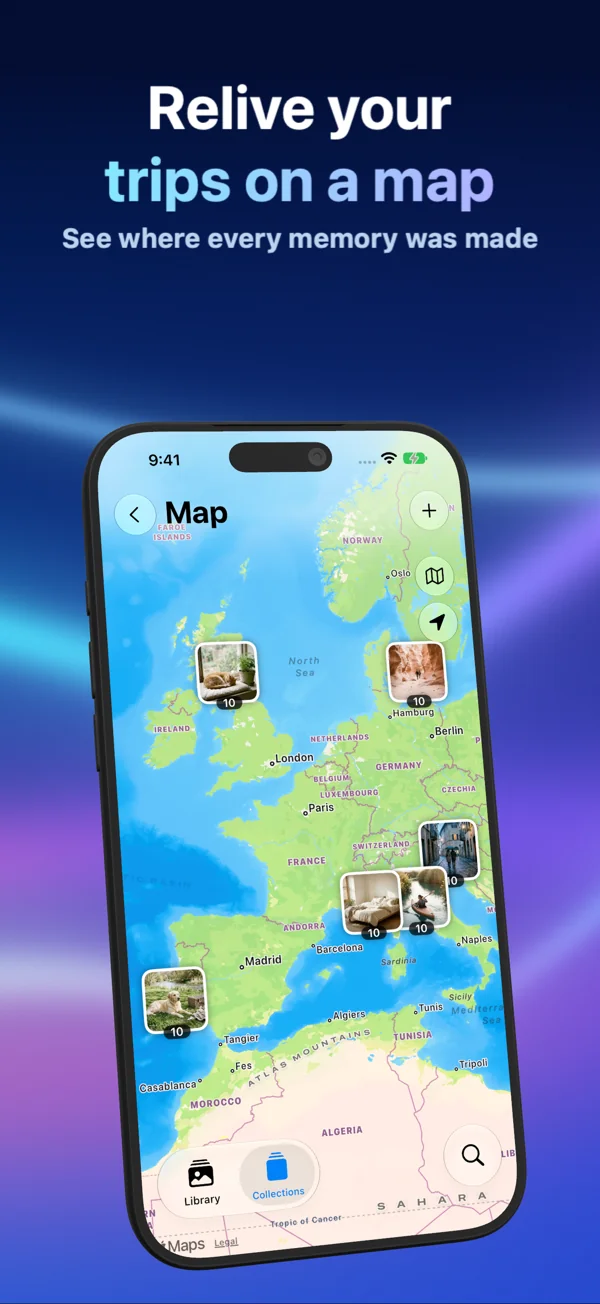
PhotoVault: Encrypt & Compress lets you import multi-page photographed agreements and addenda into a separate on-device encrypted gallery on iPhone and iPad (when separating personal records from slide decks and screen-sharing sessions), protected by encrypted local EXIF/GPS indexing for browsing memories by capture date and map location. Importing creates a separate vault copy—verify legible signatures, clauses, and album sequence and keep an independent backup before deleting originals from Apple Photos.
Why Signed Contracts & Lease Agreements Need More Than Apple’s Default Recents Grid
When storing multi-page photographed agreements and addenda when separating personal records from slide decks and screen-sharing sessions, leaving items inside the main Apple Photos library exposes them to casual swiping, Memories suggestions, Shared Library rules, and any person who knows your device passcode (since Apple’s Hidden album falls back to the iPhone passcode).
Importing selected items into PhotoVault: Encrypt & Compress (id6824412013, free to download on iOS 26+ and iPadOS 26+) places both the media and its local metadata index under on-device encryption with an installation key stored on your device, with zero Arte Soft cloud accounts or upload servers.
Configuring Encrypted Metadata Index + Map & Year/Month Timeline
This setup uses encrypted local EXIF/GPS indexing for browsing memories by capture date and map location. If someone in your environment knows your iPhone unlock passcode, choose a dedicated vault Password or Pattern inside PhotoVault Settings rather than system biometric authentication, because iOS system authentication permits device-passcode fallback.
PhotoVault locks automatically whenever the app enters the background. Inside the vault, albums reference existing archive entries without duplicating files, while on-device OCR text search and year/month/map views help locate multi-page photographed agreements and addenda quickly—though OCR can miss tiny or blurred characters, so descriptive album names remain essential.
Checking Quality (Legible signatures, clauses, and album sequence) & Keeping Recoverable Backups
New Lossy HEVC imports store compressed representations rather than full original files, saving substantial iPhone or iPad flash space depending on source complexity. Because lossy compression can alter fine detail, always test a small batch of multi-page photographed agreements and addenda and inspect legible signatures, clauses, and album sequence before importing a large collection.
Remember that PhotoVault’s archive key is bound to your device installation and forgotten vault passwords or patterns cannot be reset by Arte Soft support. Export critical items or verify a password/pattern-encrypted Secure Share archive—and retain an independent backup outside the phone—before deleting originals from Apple Photos and emptying Recently Deleted.
Structured Comparison & Practical Trade-Offs
| Capability | Default Apple Photos / Hidden Album | PhotoVault: Encrypt & Compress |
|---|---|---|
| Access Control | Apple Hidden Album uses Face ID / Touch ID with iPhone passcode fallback | Custom Password, Pattern, or system biometric unlock (Encrypted Metadata Index + Map & Year/Month Timeline) |
| Cloud Exposure | Syncs across iCloud Photos devices unless disabled | 100% local on-device encrypted storage; no Arte Soft cloud server |
| Storage Footprint | Full raw file size remains on device/iCloud | Optional lossy HEVC compression reduces vault size (verify fine detail first) |
| Finding Specific Items | Mixed with everyday camera roll search | Dedicated vault albums, year/month timeline, map, and on-device OCR for Signed Contracts & Lease Agreements |
| Transfer & Backup | Tied to Apple Account sync or unencrypted exports | Secure Share creates password- or pattern-encrypted archive packages |
4-Step Verification Checklist for Signed Contracts & Lease Agreements
- Download PhotoVault: Encrypt & Compress free on iPhone or iPad and configure Encrypted Metadata Index + Map & Year/Month Timeline in Settings.
- Select a small test sample of 5–10 multi-page photographed agreements and addenda from Apple Photos and import them into a clearly named collection.
- Open the imported items inside PhotoVault, zoom in to verify legible signatures, clauses, and album sequence, and test an export or Secure Share package.
- Confirm you hold an independent backup of irreplaceable originals on an encrypted drive or computer before removing copies from Apple Photos and clearing Recently Deleted.
Frequently Asked Questions
Does importing signed contracts & lease agreements into PhotoVault automatically delete them from Apple Photos?
No. Importing creates an encrypted copy inside PhotoVault. Any original in Apple Photos or iCloud Photos stays untouched unless you separately confirm deletion through Apple’s system prompt.
Should I use Password, Pattern, or Face ID for dual work & personal iphone?
Use a dedicated Password or Pattern whenever another person knows your iPhone or iPad passcode, because iOS device authentication allows passcode fallback when Face ID or Touch ID fails.
Is lossy HEVC compression safe for signed contracts & lease agreements?
Lossy HEVC compression saves iPhone storage, but it is not a byte-identical copy. Always inspect legible signatures, clauses, and album sequence on a test import and keep independent originals whenever exact pixel or document fidelity is required.
What does PhotoVault cost on iPhone and iPad?
PhotoVault: Encrypt & Compress is free to download ($0.00) on the App Store for iOS 26+ and iPadOS 26+, with optional Personal and Family Monthly, Yearly, and one-time Lifetime plans (Family Sharing supported on Family plans).
Related Guides & Tools
- All Encrypted Vault Guides (1,120 Scenarios)
- Encrypting Signed Contracts & Lease Agreements for Dual Work & Personal iPhone: Password/Pattern Vault + Secure Share Archive Verification
- Encrypting Creative Moodboards & Studio References for Dual Work & Personal iPhone: Encrypted Metadata Index + Map & Year/Month Timeline
- Encrypting Signed Contracts & Lease Agreements for Offline Zero-Cloud Archive: Password/Pattern Vault + Secure Share Archive Verification
- Secure Share & Backup Workflows Hub
- iPhone & iPad Vault Storage Breakdowns
- Encrypted Vault Storage & Cloud Savings Calculator
- Before Deleting Originals from Apple Photos Checklist